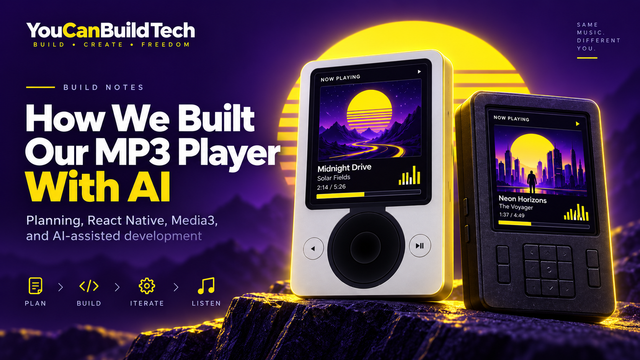
Here at You Can Build Tech, we practice what we preach and build real projects on a weekly basis.
One of the things we want to show is that there is a big difference between the heavily marketed AI app builders you see every day on YouTube and social media, and using AI as part of a more complete development process.
You don't necessarily need months of planning before starting a project. But spending some time figuring out what you actually want to build before handing everything over to a coding agent can make an enormous difference.
For our latest project, we decided to build a full MP3 player.
The result is actually a relatively simple app underneath. It imports music, plays it, organizes it and remembers what the user is doing. But visually we went much further, with several completely different player interfaces inspired by the dedicated MP3 players of the 2000s.
And despite eventually growing to more than 22,000 lines of code, this turned out to be one of our smoothest AI-assisted builds so far.
Here's How We Planned Our MP3 Player
We didn't start by writing a giant technical specification.
Instead, once we had decided what kind of MP3 player we wanted to make, we asked ChatGPT to take us through the product one feature at a time.
ChatGPT would suggest a feature or behavior, explain what it could add to the player, and then we would approve it, reject it or modify it before moving on to the next one.
We probably accepted somewhere around 80–90% of the suggestions.
Some were exactly what we wanted immediately. Others were good ideas that we customized further, and occasionally we decided that a suggestion simply didn't belong in the app.
This gave ChatGPT quite a lot of freedom to contribute to the product rather than using it purely as a machine waiting for us to tell it what to do.
At the same time, we retained the final say over everything that actually became part of the player.
We Went Deep Into the Small Details
The basic feature set of an MP3 player is obviously not difficult to imagine. You need playback, a music library, queues, playlists, favorites and the usual playback controls.
We went considerably deeper than that.
We discussed exactly what should appear inside menus, how queues should behave, how playlists should work, when a song should count as having been played, what statistics should be remembered, which metadata should be displayed, how the app should behave when reopened, what equalizer controls should be available and how different player interfaces could present those controls differently.
We also discussed what not to include.
For the music side of the application, we mostly concentrated on features that belonged in a real music player. We weren't interested in adding features simply because AI could build them.
Our main reference point was the era of standalone MP3 players rather than modern streaming applications. We were thinking about devices such as Apple's iPod, Microsoft's Zune, Creative players, Sony music players and the enormous variety of smaller MP3 players people used before smartphones took over.
That gave the project a very clear identity.
AI Designed Most of the Technical Architecture
Where we did not spend much time was manually deciding which software component should communicate with which other component.
Once the features and behavior had been established, AI worked out most of that for us.
It decided how the application should be divided, what should belong to the shared music system, what should belong to the individual player interfaces, what needed to reach Android or iOS directly, and how the different parts should communicate.
So it would be inaccurate to say that we designed the complete architecture and then gave it to AI to code.
The process was much closer to designing the product together with AI, approving the important decisions and then allowing AI to determine a sensible technical implementation.
For this particular project, that worked extremely well.
What Was Our Tech Stack?
The bulk of our technology stack was also decided during the planning phase.
For the main application framework, we used React Native 0.86 with React 19.
React Native was originally developed at Facebook, now Meta, and allows most of our application to exist in one shared codebase while still giving us access to native Android and iOS functionality when we need it.
We purposely stayed away from the myriad of generic UI kits and larger navigation frameworks available for React Native because we wanted as much control over the appearance of the player as possible.
That turned out to be important.
Our app doesn't have one conventional mobile interface with several themes applied to it. The individual player designs can have completely different proportions, controls, screens, menus, visualizers and ways of displaying album artwork.
Using a generic UI system everywhere would have introduced restrictions we simply didn't need.
This was another decision we discussed with ChatGPT before serious coding began.
Plan With a Chatbot, Then Move Into a Coding Agent
This project has reinforced a workflow that we have increasingly come to like.
We use a conversational AI such as ChatGPT to explore and plan the product first. Then, once we know what we want, we move into a coding agent such as Codex or Claude Code for the implementation.
The first stage gives us room to talk through ideas, reject features, compare approaches and change our minds without constantly modifying the actual codebase.
The coding agent then receives a much clearer idea of what it is supposed to build.
For us, that gives substantially more control over the finished product than simply opening a coding agent and typing something like "build me an MP3 player."
What Did We Use for Android Audio?
For Android playback and several of the player-specific audio features, we went with AndroidX Media3 and ExoPlayer.
ExoPlayer is now part of Google's Media3 framework and provides a mature native Android playback system, so there is very little reason for us to try to invent our own audio engine from scratch.
It is also open-source software under the Apache 2.0 license.
So we'll give Richard Stallman a symbolic thank-you for helping create the world in which we can build software on top of excellent free and open-source components, even though he obviously didn't write ExoPlayer himself.
For some of the more specialized audio functionality, including equalization and visualization, our application also reaches Android's native audio and media systems.
What About the iOS Version?
We haven't completed the native iOS implementation yet, but the application was planned for both Android and iPhone from the beginning.
For iOS, we plan to use Apple's AVFoundation family of frameworks for the native audio side, including AVPlayer or related components where appropriate.
One small technical distinction is that AVFoundation is mainly concerned with media. Importing and accessing files will use Apple's appropriate document and file APIs rather than pretending AVPlayer itself is a file-management system.
We also plan to use Core Motion for some of our more unusual player designs.
Core Motion exposes data from hardware such as the iPhone's accelerometer and gyroscope. That means we can potentially have certain interfaces visually respond when the user tilts or moves the phone.
Unlike Media3, Apple's frameworks aren't free software in the Richard Stallman sense. They are proprietary Apple platform frameworks, although there isn't a separate AVFoundation license fee that you pay every time you use them in an iOS application.
Why Did We Use TypeScript?
The shared React Native portion of the application is primarily written in TypeScript.
TypeScript is Microsoft's typed extension of JavaScript. In simple terms, it allows the code to describe more clearly what kind of information different functions and components expect.
We think that works particularly well with coding agents.
When different parts of an application have explicit types and relatively simple interfaces, there is less ambiguity about what the agent is supposed to pass between them. This is one reason we think strongly typed languages and clearly defined interfaces are becoming increasingly interesting in the AI coding era.
Programming Languages That Are Growing in the AI Era
How Does TypeScript Reach Android and iOS?
For communication between our TypeScript code and native Android or iOS implementations, we use React Native Turbo Native Modules and Codegen.
This is the modern React Native approach for building typed interfaces between the shared application and native platform code.
We define what the React Native side needs from the native implementation, and Codegen generates much of the repetitive plumbing needed to connect those interfaces.
On Android, the platform-specific implementation can then be written in Kotlin and talk directly to Android.
The equivalent iOS implementation can reach Apple's native frameworks.
So yes, this native layer is essentially the part that allows the shared React Native application to reach down into the operating system when JavaScript or TypeScript alone isn't the right tool for the job.
Metro, Babel and Hermes
As you would normally expect with React Native, the project also uses Metro, Babel and Hermes.
Metro is the bundler used by React Native. Babel handles JavaScript transformations where required, while Hermes is the JavaScript engine that runs the React Native JavaScript code on the device.
These technologies aren't really part of the personality of our MP3 player, and the user will hopefully never have any reason to know they exist.
But they are part of the machinery underneath the application.
Testing and Code Quality
For testing and code quality, we used Jest, React Test Renderer, ESLint, Prettier and the TypeScript compiler.
Interestingly, this area also gave us one of the few genuine workflow problems we encountered during the project.
We started noticing that Codex was sometimes consuming a surprisingly large number of tokens on relatively small fixes.
Eventually we discovered one of the reasons.
During one fairly minor change to the player user interface, Prettier ended up reformatting around 2,400 lines of code.
The application had not suddenly become 2,400 lines better. Most of the changes were simply formatting.
This becomes particularly wasteful when a coding agent is involved because unnecessary code changes create larger diffs, require the agent to process more code and ultimately consume more tokens.
We don't regularly sit down and manually admire the formatting of thousands of lines of AI-generated TypeScript anyway, so there was very little benefit to doing this.
We Eventually Gave Codex Its Own Rules
After noticing this behavior, we created a small Markdown (.md) instruction file telling Codex not to rewrite working code simply because another version might look prettier.
The idea was not to prevent Codex from making architectural changes.
That would be counterproductive.
Instead, we told it that when a small direct change can solve a problem, it should prefer that approach rather than performing a large unrelated rewrite.
If something genuinely needs restructuring, the agent can still do it.
We just don't want 2,400 lines changing because a formatting tool has strong opinions about whitespace.
How Is the App Structured?
At a high level, the application ended up divided into three major areas: the shared music system, the different player frontends and a relatively thin native platform layer.
That separation is one of the reasons we can create so many different-looking players without rebuilding the actual music functionality each time.
The Music Engine
The music engine owns the important state and functionality of the player.
That includes playback, the current song, queues, the music library, playlists, favorites, listening statistics, equalizer settings, search and other music-related behavior.
It also handles persistence, which simply means saving important information so it is still there after the application is closed and reopened.
For example, the app can remember which song you were listening to, your queue, your playback position, playlists, favorites, equalizer settings and other information that would be annoying to lose every time you closed the application.
The equalizer can also appear differently depending on the player interface.
One interface might expose simple controls such as Bass, Mid and Treble, while another can expose presets such as Rock, Pop, Jazz, Classical or Electronic.
They can look completely different while still controlling the same underlying audio system.
The Player Frontends
The second major part of the application is the collection of player frontends.
This is where most of the visual personality lives.
We can have as many player interfaces as we want, including designs inspired by both small and large standalone MP3 players from the 2000s.
Each can have its own screen arrangement, physical proportions, controls, menus, artwork presentation and visualizers.
The important part is that these are not completely separate music applications.
They sit on top of the same shared music system.
If a song is already playing and the user changes from one player to another, the new frontend picks up the same state. The queue remains intact, the current track remains intact and the playback position remains intact.
Only the presentation changes.
This turned out to be one of the most useful architectural decisions AI made for the project because it means we can continue creating radically different player interfaces without duplicating the music engine.
The Native Platform Layer
The third part consists of relatively thin native adapters that handle work requiring closer access to Android or iOS.
This includes things such as playing local files, importing music, accessing platform storage, responding to device motion, processing equalizer behavior, generating visualizer data and integrating with operating-system media functionality.
On Android, this is where our Kotlin code enters the picture.
On iOS, the equivalent functionality will use Apple's native APIs.
Most of the application therefore remains inside our shared TypeScript codebase, while the platform-specific layer deals with the jobs where Android and iOS genuinely need to be treated differently.
How Much Code Did the MP3 Player Take?
By the time we took the screenshots for this article, the repository had grown to around 22,159 lines of code across 165 files.
That might sound surprisingly large for something we have described as a relatively simple application, but the interesting part is where those lines actually went.
The project is overwhelmingly written in TypeScript and TSX, which together represent more than 90% of the codebase. Kotlin currently accounts for around 7%, while there is almost no Swift yet because the native iOS implementation has not been completed.
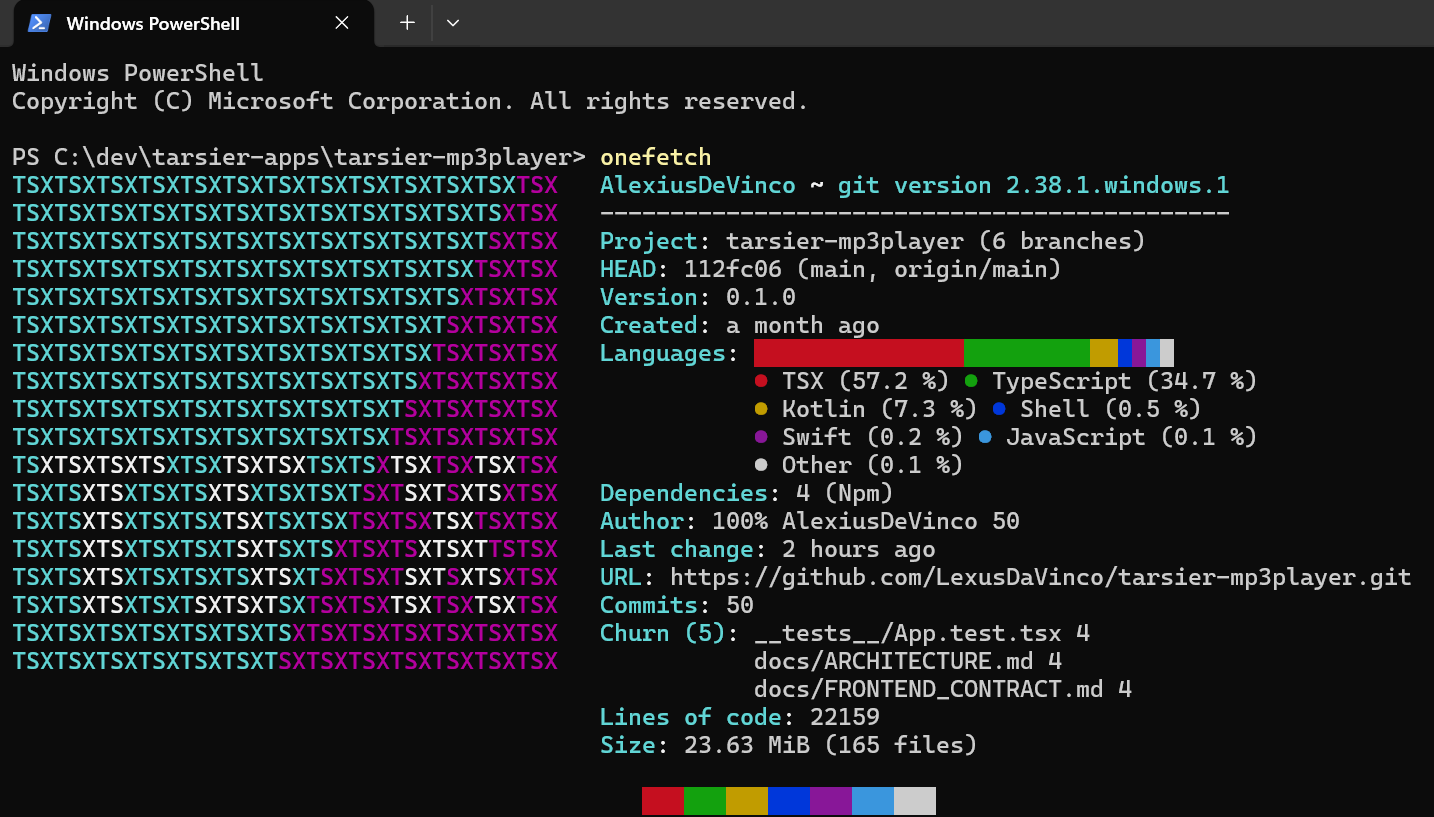
The shared React Native application itself currently contains around 15,476 lines of TypeScript and TSX.
Most of the Shared Code Is Actually the Player Designs
The most interesting number in our code breakdown is probably the frontend.
Our frontends section currently contains around 9,481 lines of code, while the actual music engine and music-related features contain around 3,415 lines.
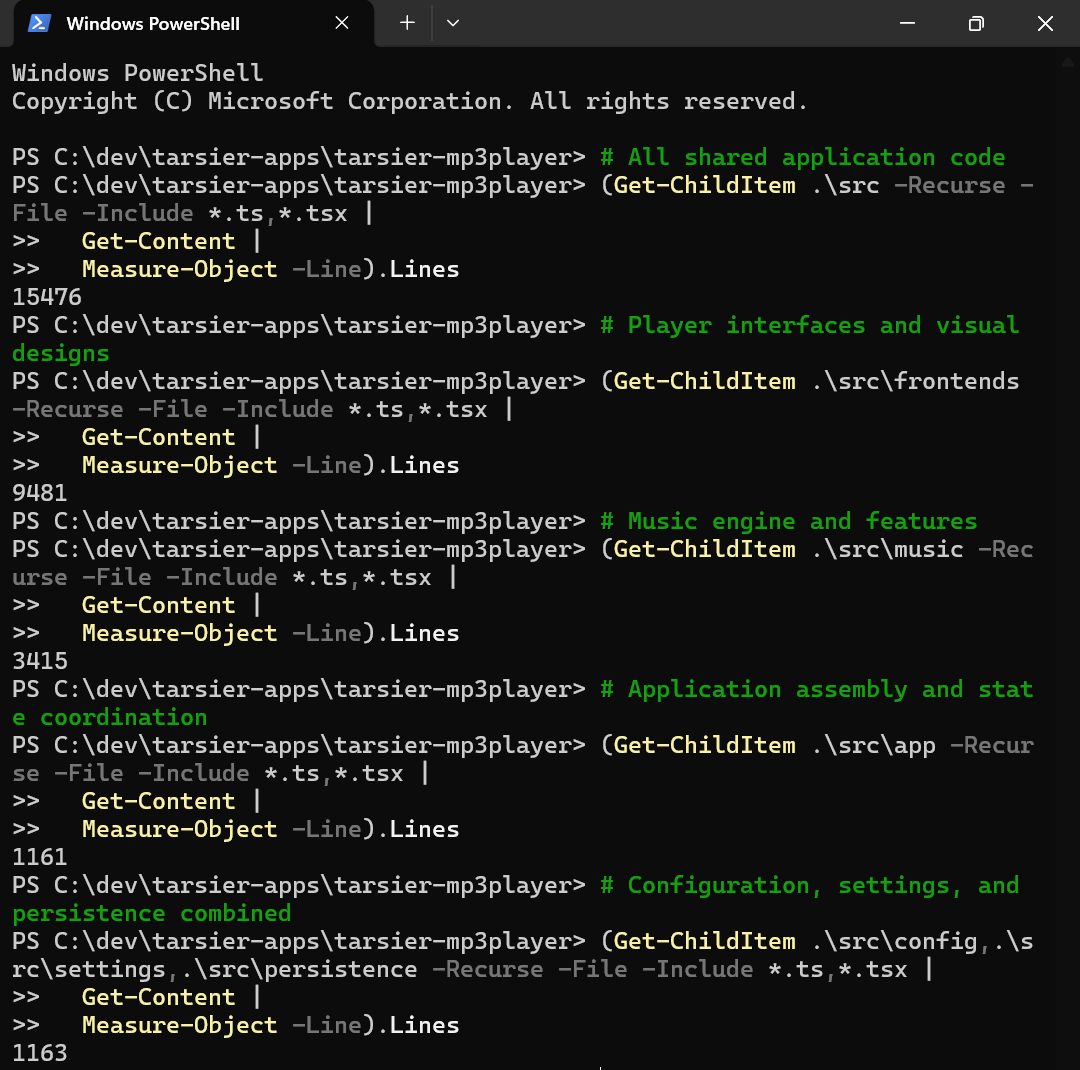
In other words, roughly 61% of our shared application code currently lives in the player frontend area.
That describes this project extremely well.
Playing an MP3 file isn't particularly exotic technology. Modern operating systems already give developers extremely capable media frameworks.
What took considerably more work was making the application feel like a collection of actual music players rather than a generic mobile screen containing Play, Pause and Skip buttons.
Every player can have its own layout, screen proportions, controls, menu behavior, visualizer presentation and album artwork treatment. Once you start building genuinely different interfaces rather than simply recoloring the same screen, the amount of frontend code naturally grows very quickly.
A large part of this application's code exists because we wanted the product to look and feel far more elaborate than its basic purpose really is.
One Music System Underneath All of Them
Even though the player frontend code is large, the individual player designs don't each contain their own separate playback systems.
They all operate on top of the same shared music state.
This means adding another visual player doesn't mean rebuilding playlists, favorites, queues, playback or the music library again.
A new frontend is essentially another way of displaying and controlling the music system that already exists.
That separation gives us considerable freedom on the visual side without making the underlying application unnecessarily complicated.
How Much Native Android Code Did We Need?
At the time of writing, the Android playback area contained around 1,586 lines of custom Kotlin.
We also had only around 82 lines of TurboModule specifications defining parts of the communication between the shared TypeScript application and the native platform layer.
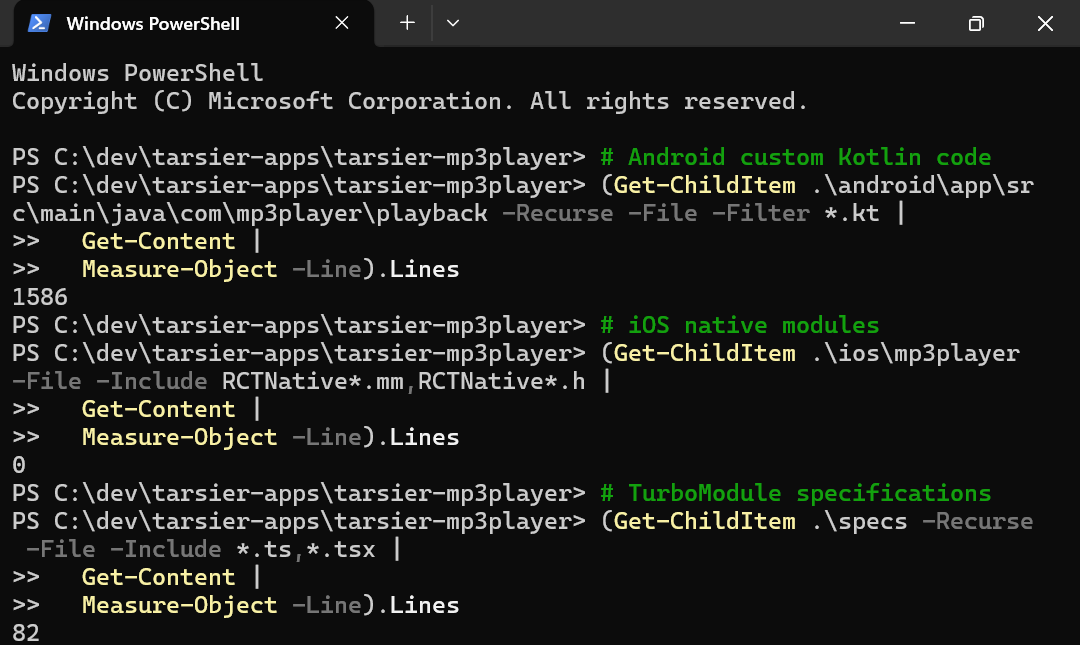
These numbers are another good illustration of why we chose React Native.
We don't need to write the entire application again in Kotlin for Android.
Most of the application can remain shared, while the relatively small native layer handles the jobs where direct Android access genuinely makes sense.
When we complete the iOS side, Swift and Apple's frameworks will naturally become a larger part of the repository as well.
More Than 22,000 Lines Doesn't Mean We Typed 22,000 Lines
There is another fairly obvious point worth making in an article about AI-assisted development.
We did not manually type 22,159 lines of code.
That is precisely what makes this type of development interesting.
The coding agent handled the overwhelming majority of the implementation. Our time was much more heavily concentrated on deciding what the product should do, testing what had been built, identifying things we didn't like and refining the result.
And despite eventually reaching more than 22,000 lines, the actual coding phase was almost bump-free.
We Never Encountered a Major Bug
Throughout this project, we never encountered what we would describe as a major bug.
That doesn't mean everything was perfect on the first attempt.
One example was a song failing to continue correctly after switching from one player interface to another. That needed to be fixed.
But problems at roughly that level were about as dramatic as the project became.
Much more commonly, the things we asked Codex to change were visual.
A control needed moving slightly. Spacing didn't look quite right. A visualizer needed adjusting. One player screen needed different proportions. An element needed to sit a little higher or lower.
Most of the development time was therefore not spent rescuing broken software. It was spent polishing software that was already working.
For an application of this size, that made the entire project feel surprisingly straightforward.
The Code Count Is Slightly Misleading
Looking at more than 22,000 lines of code can make the project sound much more technically complicated than it really is.
At its core, the application has a fairly simple purpose.
It imports music, organizes it, plays it properly and remembers the user's state.
The reason the codebase grew substantially larger is that we put so much effort into the different ways that simple functionality can be presented.
The core music engine is relatively modest compared with the amount of code devoted to the player interfaces.
That was intentional.
We weren't trying to make an MP3 player technically complicated just for the sake of it. We wanted to take something fundamentally simple and make it feel unusually polished, fun and complete.
The final result looks far more elaborate than the underlying concept really is, and when you use it, it behaves exactly the way a real MP3 player should.
How Is the Finished App Configured?
The appearance and available options of a finished version of the app can largely be described using a versioned JSON configuration bundle.
The important distinction is that the JSON file is not generating the entire application from nothing.
The player frontends, music engine and underlying capabilities already exist.
The configuration determines things such as which frontends are available, which colorways they use, which assets belong to them and which optional features should be enabled.
The application validates this configuration before using it so that broken or incomplete combinations can be caught rather than blindly loaded.
Because the presentation and music state are separated, switching player designs doesn't destroy what the user was doing. The current track, queue and playback position can remain intact while the interface around them changes.
This gives us a remarkably flexible application without needing to create separate versions of the music engine for every visual design.
What Did We Learn From Building It?
One of the clearest lessons from this project was how effective feature-by-feature planning with AI can be.
We didn't walk into the project knowing every feature we wanted.
Instead, we allowed ChatGPT to contribute ideas.
It suggested something, we considered it and then we approved, rejected or refined it before moving on.
By the end of that process, we had effectively produced a very detailed product specification through conversation without sitting down and manually writing one from scratch.
AI then translated those decisions into the technical architecture and the coding agent implemented it.
For this project, the process worked exceptionally well.
The app itself isn't conceptually complicated, and that probably helped. But we also believe the amount of planning we did before serious implementation contributed to how few technical problems we encountered later.
We spent a lot of time deciding what we wanted before asking a coding agent to build it.
Once development began, most of our effort could therefore go into refinement rather than repeatedly changing the fundamental product underneath it.
That distinction is increasingly important to how we think about AI development at You Can Build Tech.
There is a big difference between simply asking AI to build you an app and actually building an app with AI.
The amount of manual coding required has changed dramatically.
The importance of deciding what is worth building has not.